
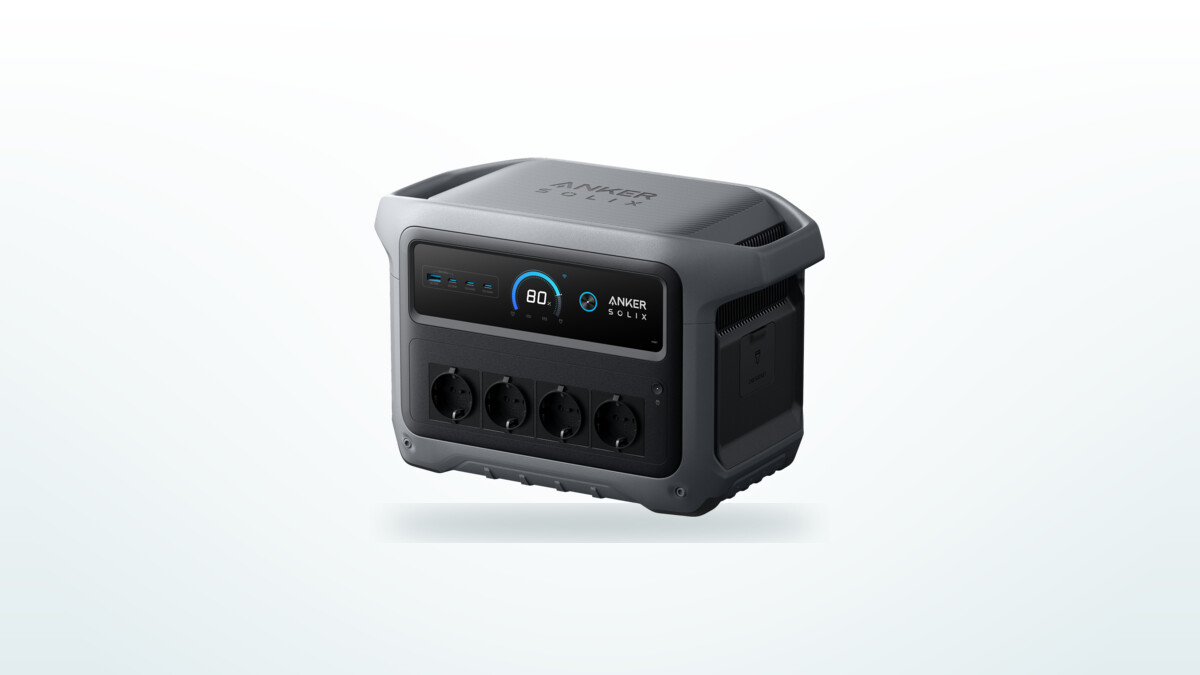
What the 1024 Wh are really worth
This is the figure quoted everywhere, and it is the one that needs the most qualifying. The 1024 Wh describe the energy stored in the cells, not the energy you will get back from a mains socket. An inverter sits between the two, and it takes its cut.
The conclusion is counter-intuitive: the more power you draw, the larger the share you get back. Under a load of about 250 W, the station delivers 850 Wh before shutting down, or 83 % of its nominal capacity. Under a load ten times heavier, it delivers 920, or 90 %. On a resistive load bench, the figure sits around 890 Wh.
The explanation fits in one sentence: the inverter draws a roughly fixed amount of power, in the region of 20 to 30 W, whatever is plugged into it. On a 1500 W induction hob, that overhead is negligible. On a 15 W broadband router, it almost doubles the real consumption. This is why a station of this type is a poor choice for running very small devices for days on end, and an excellent one for absorbing high-power peaks.
A useful corollary: the USB outputs do not go through the inverter. Charging devices over USB-C rather than through a mains adapter plugged into a socket recovers a noticeably larger share of the battery, in the region of 94 % on this family of stations. Over a weekend spent charging phones, lamps and a laptop, that habit is far from trivial.
What a full charge actually costs
The other half of the equation rarely gets a mention: how much do you have to pull from the wall socket to fill the battery? Around 1110 to 1190 Wh, depending on the charging speed chosen. A 1024 Wh station therefore costs roughly 1.15 kWh to fill.
That round-trip efficiency of roughly 77 % matters as soon as daily use is on the table: storing electricity to use it later costs about a quarter of the energy along the way. It is a respectable figure for the category, but it changes the answer to certain questions. Using a station to shift consumption into off-peak hours, for instance, only pays if the tariff difference comfortably exceeds those 23 % of losses.
A counter-intuitive detail few people expect: charging slowly does not improve efficiency, it makes it worse. The charging electronics work at their best point around their nominal rating; at low input power, their own consumption weighs proportionally more. Capping the input at a few hundred watts, the instinctive way to silence the fans, therefore costs a little extra in losses.
The advertised 49 minutes, and what they require
This is the product's central selling point, and it is largely deserved: no other 1 kWh station fills up this fast. But the 49-minute figure corresponds to one specific mode, and it is not the one it ships in.
| Configuration | Input power | Charge from 0 to 100 % |
|---|---|---|
| Default, no adjustment | 1200 W | about 55 min |
| Fast mode enabled in the app | 1600 W | about 49 min |
| Input capped for quiet running | a few hundred W | several hours |
Three further conditions govern access to those 49 minutes, and they are worth knowing before you buy: fast mode has to be switched on by hand in the app, it requires the original mains cable, and it only engages if the battery is above 20 °C. Taken out of a car boot in winter, the station will charge considerably more slowly whatever the setting.
One design point deserves highlighting, because it is unusual: input power does not collapse at the end of the charge. Where many batteries crawl through their last twenty per cent, this one is still absorbing close to 1200 W as it approaches 100 %. That is precisely what explains the stopwatch.
How long it actually lasts
Runtimes calculated from the nominal 1024 Wh are consistently optimistic. The figures below start from the energy genuinely available at each power level.
| Power drawn | Energy available | Typical use | Runtime |
|---|---|---|---|
| 1500 W | about 920 Wh | Induction hob, portable heater | about 35 min |
| 1000 W | about 920 Wh | Microwave, kettle | about 55 min |
| 250 W | about 850 Wh | Full desk setup, television | about 3 hr 20 |
| A few tens of W | appreciably less | Router, LED lighting, security camera | penalised by the inverter's own draw |
For short, repeated uses, which are the most common both when camping and as household back-up, it is more meaningful to think in numbers of uses per full charge.
| Use | Energy consumed | Per full charge |
|---|---|---|
| Full smartphone charge | about 20 Wh | around forty |
| Full laptop charge | about 120 Wh | 7 times |
| Kettle, 500 ml of water | about 55 Wh | around fifteen |
| A working day on a laptop | about 190 Wh | 4 days |
One observation drawn from these figures, valid well beyond this station: to boil the same amount of water, the energy consumed barely varies with the appliance's power rating. A 1200 W kettle and a 400 W one use the same energy to within a few watt-hours, the first simply being three times faster. Running on battery, a powerful and brief appliance therefore beats a gentle and slow one, which leaves the inverter running longer for nothing.
Noise, the real sticking point
This is the most consistent criticism levelled at this station, and it is justified. The cooling is sized to handle 2000 W of output and 1600 W of input in a compact case: the fans have to work, and you hear them.
| Situation | Noise level | In practice |
|---|---|---|
| Light load | very low to inaudible | Fans stopped most of the time |
| Moderate output, around 600 W | about 36 dB | Noticeable in a quiet room, not intrusive |
| Fast charging or heavy output | about 45 dB at 1 m | Clearly audible, intrusive in a bedroom |
| Charging at full input power | over 50 dB | Impossible to ignore in the same room |
The absolute level is not the most irritating part, though. What comes up most often is how uneven the fan speed is: it rises and falls in pitch instead of holding a steady rush of air, which catches the ear far more than a constant noise of the same intensity. Charging overnight in a living space, that is a deal-breaker for most people.
There is a workaround, and it works: capping the input power in the app brings the fans back down to a discreet whisper, or to silence. The trade-off is plain, a recharge spread over several hours instead of one, and slightly worse efficiency. For a station you put on charge at night and use during the day, that is the right setting. For a station you want full before heading out, you will have to accept the noise.
Another direct consequence of that thermal design: under sustained discharge close to the maximum, the internal temperature approaches the protective cut-out threshold. The station holds up without faltering, but it has little margin, and the fans will not calm down as long as the demand lasts. The fastest charging mode can in fact trigger an internal temperature warning, which confirms it is working at the limit of what the cooling can shed.
Solar: 600 W on paper, far less in practice
Solar input is rated at 600 W, and the headline solar charging time rests on that figure. It assumes a complete panel array, correctly wired, under optimal sunshine. That is not what most owners will encounter.
| Configuration | Conditions | Power obtained |
|---|---|---|
| One 400 W panel | Full sun | 140 to 200 W |
| One 200 W panel | Full afternoon sun | 140 to 170 W |
| Several panels in parallel | Optimal conditions | close to the rated ceiling, rarely reached |
| Overcast sky or low sun | Winter, early morning | a few tens of watts |
The gap between a panel's peak rating and what it actually delivers is not specific to this station, it is the general rule of portable photovoltaics: approximate orientation, cell temperature, wiring and atmospheric scattering easily cost half the figure printed on the label. You simply need to know that before relying on it. A full solar recharge in a single day calls for a substantial array, not the single panel sold in a bundle.
One positive point does deserve a mention, because it corrects a genuine flaw of the previous generation: this version accepts mains and solar charging at the same time, with solar given priority and the grid making up the difference. The first-generation C1000 simply ignored the solar input while a mains cable was plugged in, which forced all sorts of contortions to make use of the sun. That problem is behind us on this generation.
As a UPS: what it really protects
The UPS function is one of the product's most interesting arguments, and one of the most misunderstood. The principle: appliances stay plugged into the station, which is itself fed from the mains, and it switches to its battery when the power drops. The stated switchover time is 10 ms, with a dedicated certification.
In practice the protection works for common uses: a desktop computer, a home storage server, a router, a fridge and a freezer all ride through an outage without restarting. On a prolonged cut, the runtime quoted for a domestic fridge runs into hours, ample for a grid incident.
Two important reservations, however, for anyone considering serious computing use.
The first: there is no signalling port to the computer. A conventional UPS tells the machine it has switched to battery, which allows a clean shutdown to be triggered before the reserve runs out. Here there is nothing: if the outage lasts longer than the runtime, the appliances simply cut off. For a server or a workstation with data being written, that is a real limitation.
The second concerns wear: leaving the station permanently in line keeps the battery working continuously, through successive micro-cycles of discharge and recharge, even with no outage at all. A battery rated for several thousand cycles tolerates that regime, but it spends service life on something that, most of the time, achieves nothing. Reserving the function for risky periods, storms or grid work, is a more sensible approach than leaving it in line all year.
Gen 1 or Gen 2: making the right call
Both generations are still on sale, sometimes at similar prices, and the choice is not obvious. This second generation is not a simple update: it is a repositioning, with real gains and real losses.
| Criterion | C1000 (first generation) | C1000 Gen 2 |
|---|---|---|
| Capacity | 1056 Wh | 1024 Wh |
| Continuous power | 1800 W | 2000 W |
| Weight | 12.9 kg | 11.3 kg |
| Claimed recharge time | 58 min | 49 min |
| Capacity expansion | yes, up to about 2100 Wh | no |
| Built-in LED torch | yes | no |
| USB-C | 100 W + 30 W | 2 ports of 140 W |
| Simultaneous mains and solar | no | yes |
| Claimed cycles | 3000 | 4000 |
On paper the call looks simple: if your needs may grow, the first generation keeps a decisive argument in its add-on battery, which takes the pair to about 2100 Wh. No saving in weight really compensates for losing that headroom, particularly for a van conversion or household back-up, where people almost always underestimate their needs at the outset.
In practice, the market has already decided for you. The first generation is no longer distributed directly: it turns up only through third-party sellers clearing stock, at prices that now exceed those of the second. Paying more for a heavier, less powerful and slower model only makes sense in one specific case: if the capacity expansion is genuinely essential to you and you intend to buy the add-on battery straight away, itself increasingly hard to find. Put differently, the theoretical case for the Gen 1 has largely evaporated for a buyer today.
For very nearly everyone, this second generation is the one to aim for: 1.6 kg less is felt immediately, the 2000 W widen the range of appliances you can run, the two 140 W USB-C ports save you carrying mains adapters, and it now costs less than the model it replaces. Losing the LED torch bar remains an annoying step backwards on a product also sold for power cuts: when the lights go out, a station that lights itself is not a gimmick.
Reliability, firmware updates and warranty
The build inspires confidence: sturdy case, careful finish, non-slip feet, a display readable in bright sunlight. In the field these stations shrug off long journeys, dust, temperature swings and even drops.
There is nevertheless a fringe of failures it would be dishonest to leave unmentioned, and it concerns the electronics and software more than the mechanics: inverters that stop feeding the sockets with no apparent hardware fault, wireless interfaces that give up after a few weeks, units stuck at start-up after a firmware update. These cases remain a minority given the volumes sold, but they are not anecdotal.
On service life, a distinction is needed. The warranty is 5 years. The 10-year figure that accompanies the product's marketing refers to a design life, calculated from the claimed cycle count and a typical usage pattern. These are two different things, and only the first one covers you. The cell chemistry used is genuinely the most durable on the market, and self-discharge in storage is limited to a few per cent over several months, which makes it a dependable emergency reserve you can leave sitting.
Who it is for
This station is cut out for one specific profile, and it fits it very well.
It suits perfectly anyone who wants a compact energy reserve able to absorb heavy occasional loads and fill up quickly between uses: an unplanned weekend away, a day on site with no power, a workstation to protect against outages, back-up for a van already equipped otherwise. For those uses, the charging speed and the 2000 W available make a genuine day-to-day difference, and the weight-to-capacity ratio is among the best on the market.
It suits badly in three situations. Running small appliances for several days, first: efficiency drops away there and a less powerful but more frugal station will do better. Living off solar, next: reaching the 600 W input calls for an investment in panels that the sales pitch plays down. Sleeping in the same room, finally: the fans rule that out as soon as the station is working.
That leaves the question of which generation to choose. It matters less than it seems: with the first only available as end-of-line stock, at a price now higher than the second, going for it only makes sense if the add-on battery is essential to you and you can still get hold of one. In every other case, this second version is the better of the two, and the cheaper.