
Why and How Often Should You Clean a Solar Panel?
Dust, pollen, and atmospheric residue that settle on a solar panel form a film that blocks part of the sunlight before it reaches the photovoltaic cells. Light soiling causes an average loss of 3 to 5 % in output, a loss that's often invisible day to day but adds up over the year.
The right frequency depends mostly on the environment: twice a year is usually enough for a roof panel in an open rural area, while monthly cleaning is recommended near a busy road, under trees (sap, bird droppings), or by the coast, where salt spray leaves a corrosive residue.
How to Clean a Solar Panel Without Damaging It
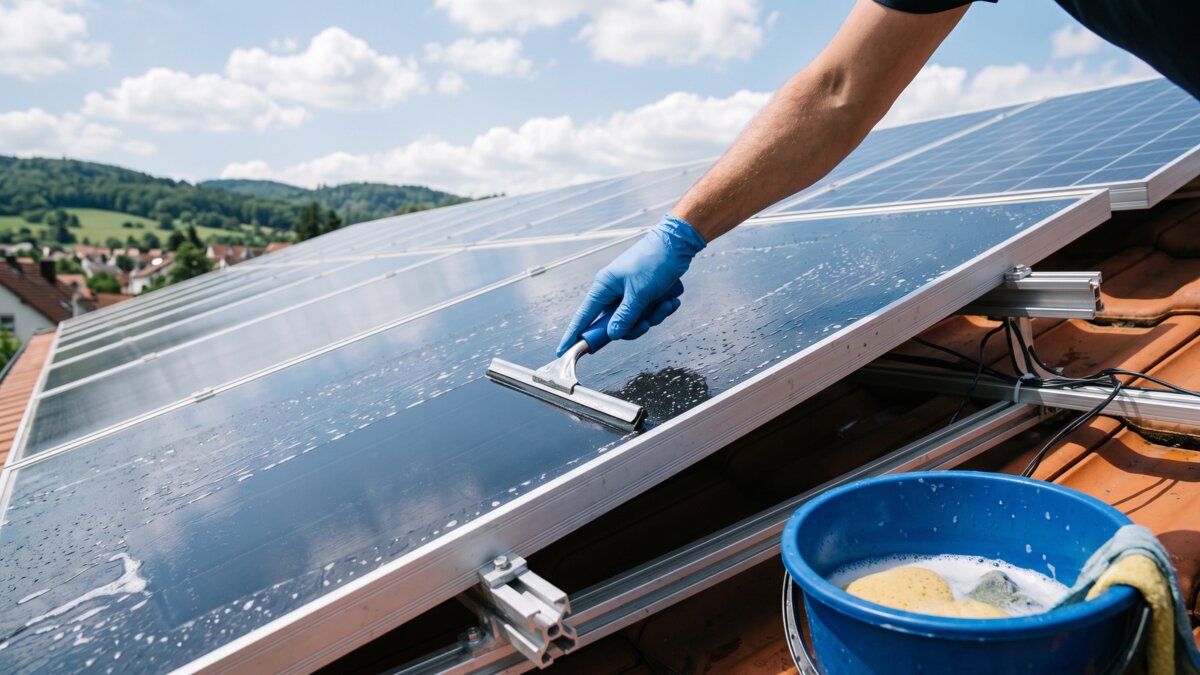
- 1. Pick the right time. Early morning or evening, when the panel is cool: cleaning a hot panel in full sun with cold water can crack it through thermal shock.
- 2. Dust it off dry first. A soft brush or a low-pressure water jet already removes dust and leaves before the actual wash.
- 3. Wash with clean or mildly soapy water. A mild, non-abrasive soap is enough for stubborn stains, never a strong detergent that could damage the seals.
- 4. Use a soft squeegee or a microfibre cloth. Never an abrasive sponge, a metal brush, or any hard object that could scratch the tempered glass and create weak points.
- 5. Rinse with clean water and let it air-dry. Natural drying avoids limescale marks that would gradually eat into output again.
How to Test a Solar Panel With a Multimeter
Once the panel is clean, a simple test confirms whether it's producing up to its rated specs. Disconnect the panel from the charge controller, expose it to full sun, and measure the open-circuit voltage (Voc) across the MC4 cable terminals with a multimeter set to DC voltage: the reading should be close to the Voc printed on the panel's label, within a few percent depending on temperature.
For a deeper check, a short-circuit current test (Isc, multimeter set to amps, panel still disconnected from the rest of the circuit) gives a second data point: a current well below the stated Isc, despite full sun and a clean panel, points to a damaged cell or a faulty internal connection.
Warning Signs of a Real Problem (Not Just Dust)
Cleaning fixes most gradual output declines. Some signs, however, call for a closer inspection:
- A sudden, sharp drop in output rather than a gradual one: usually an unplugged or damaged MC4 connector, worth checking first.
- Visible hot spots (localised discolouration, a cell that looks noticeably darker): a sign of a failing cell that can, over time, damage its neighbours.
- Output that drops sharply as soon as a small partial shadow touches the panel (cable, branch, chimney): panels without functioning bypass diodes are especially sensitive to this.
- A junction box that looks visibly melted or warped: a sign of overheating that calls for shutting the panel down immediately, before any fire risk.